Table Pong 2D Arcade
Reviews
💡Table Pong 2D delivers a faithful arcade experience with responsive controls and increasing ball speed. The two-player focus encourages friendly competition and quick reflexes. Matches are short but engaging, making it easy to replay. A solid choice for casual gaming sessions.
Description
Game Introduction
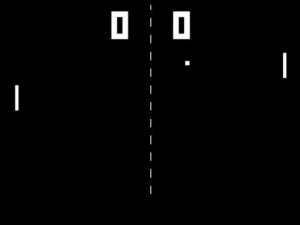
Table Pong 2D is a classic arcade-style game that brings back the simple joy of table tennis in a digital format. Designed for two players, this game challenges you to control paddles on opposite sides of the screen, aiming to hit a ball back and forth. The first player to reach a set number of points wins the match. With its straightforward mechanics and fast-paced action, Table Pong 2D is perfect for quick gaming sessions with friends or family. The game emphasizes hand-eye coordination and quick reflexes, making it both fun and engaging for players of all ages. Whether you are looking for a nostalgic experience or a new way to compete with a partner, Table Pong 2D delivers endless entertainment.
How to Play
To play Table Pong 2D, each player uses their keyboard to control their paddle. Player 1 typically uses the W and S keys to move up and down, while Player 2 uses the Up and Down arrow keys. The goal is to hit the ball with your paddle and send it past your opponent's paddle to score a point. The ball moves faster as the game progresses, increasing the challenge. Stay focused, anticipate the ball's direction, and use quick movements to outplay your opponent. The first player to reach the winning score, usually 5 or 10 points, wins the game. Practice your timing and positioning to become a Table Pong 2D champion.
Game Features
Simple controls that anyone can learn in seconds. Fast-paced 2-player action that keeps matches exciting. Family-friendly fun suitable for all ages. Quick matches that fit into short breaks. No downloads or installations required, play directly in your browser.
Tips for Success
To improve your performance in Table Pong 2D, focus on anticipating the ball's trajectory rather than reacting to it. Keep your paddle centered when possible to cover more of the screen. Practice with a friend to develop consistent timing and learn to vary your shots. Staying calm under pressure helps you make precise movements, especially as the ball speeds up. Regular short practice sessions can sharpen your reflexes and make you a more competitive player.
Compatibility
Faq
Can I play Table Pong 2D on my mobile device?
Is there a single-player mode against a computer opponent?
What happens if the ball hits the top or bottom edge of the screen?
Can I change the winning score or other game settings?
Is there a way to play with someone online?
How do I reset the game after a match ends?
You May Also Like

USA Truck Simulator 2024 Driving

Scribble World Platform Puzzle Game
Table Pong 2D Arcade

Racing Cars Arcade Game

Truck Transporter Driving Game

Excavator Runner Game Online Arcade Game
Bus Parking GC - Online Bus Parking Game Driving Game
Urban Race Arcade Racing

Wheelie Challenge Arcade Racing