
Reviews
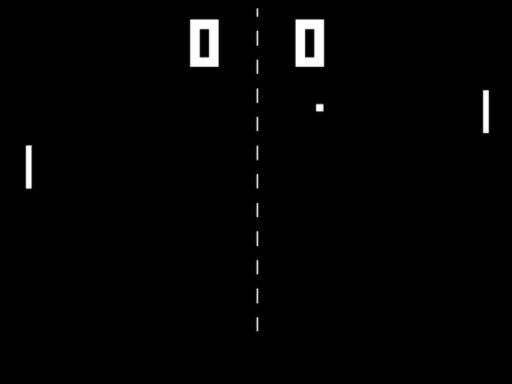
Table Pong 2D Classic is a straightforward arcade game that captures the essence of table tennis. The controls are easy to learn, and matches are quick and exciting. It is perfect for playing with a friend or family member. The increasing ball speed keeps the challenge fresh. A solid choice for casual fun.
Description
Game Introduction
Table Pong 2D Classic is a digital version of the classic table tennis arcade game. It is designed for two players who control paddles on opposite sides of the screen. The main goal is to hit a ball back and forth and score points by sending the ball past the opponent's paddle. The first player to reach a set number of points wins the match. This game focuses on simple mechanics and fast-paced action, making it suitable for quick gaming sessions with friends or family. It emphasizes hand-eye coordination and quick reflexes, providing fun and engaging gameplay for players of all ages. Whether you want a nostalgic experience or a new way to compete with a partner, Table Pong 2D Classic offers straightforward entertainment.
How to Play
To play Table Pong 2D Classic, each player uses their keyboard to control their paddle. Player 1 typically uses the W and S keys to move up and down, while Player 2 uses the Up and Down arrow keys. The goal is to hit the ball with your paddle and send it past your opponent's paddle to score a point. The ball moves faster as the game progresses, increasing the challenge. Stay focused, anticipate the ball's direction, and use quick movements to outplay your opponent. The first player to reach the winning score, usually 5 or 10 points, wins the game. Practice your timing and positioning to become a Table Pong 2D Classic champion.
Game Features
Simple controls that anyone can learn in seconds. Fast-paced 2-player action that keeps matches exciting. Family-friendly fun suitable for all ages. Quick matches that fit into short breaks. No downloads or installations required, play directly in your browser.
Tips for Success
To improve your performance in Table Pong 2D Classic, focus on anticipating the ball's trajectory rather than reacting to it. Keep your paddle centered when possible to cover more of the screen. Practice with a friend to develop consistent timing and learn to vary your shots. Staying calm under pressure helps you make precise movements, especially as the ball speeds up. Regular short practice sessions can sharpen your reflexes and make you a more competitive player.









Comments
Sign in to comment
You must be logged in before posting a review or rating.
No account? Create one
No comments yet. Be the first to comment!